Simple Area Chart
JFreeChart is a free and pure java chart library for
creating professional quality charts.
This requires the libraries
jfreechart-1.0.13.jar and
jcommon-1.0.8.jar
to be in classpath.
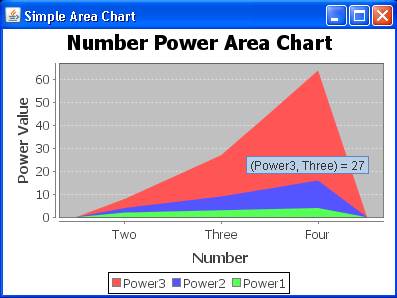
The following example shows creating a simple area chart.
package com.bethecoder.tutorials.jfree_charts.tests; import org.jfree.chart.ChartFactory; import org.jfree.chart.ChartFrame; import org.jfree.chart.JFreeChart; import org.jfree.chart.plot.PlotOrientation; import org.jfree.data.category.DefaultCategoryDataset; public class SimpleAreaChart { public static void main ( String arg []) { // Prepare the data set DefaultCategoryDataset dataset = new DefaultCategoryDataset () ; dataset.addValue ( 8 , "Power3" , "Two" ) ; dataset.addValue ( 4 , "Power2" , "Two" ) ; dataset.addValue ( 2 , "Power1" , "Two" ) ; dataset.addValue ( 27 , "Power3" , "Three" ) ; dataset.addValue ( 9 , "Power2" , "Three" ) ; dataset.addValue ( 3 , "Power1" , "Three" ) ; dataset.addValue ( 64 , "Power3" , "Four" ) ; dataset.addValue ( 16 , "Power2" , "Four" ) ; dataset.addValue ( 4 , "Power1" , "Four" ) ; // Create the chart JFreeChart chart = ChartFactory.createAreaChart ( "Number Power Area Chart" , "Number" , "Power Value" , dataset, PlotOrientation.VERTICAL, true, true, false ) ; // Render the frame ChartFrame chartFrame = new ChartFrame ( "Simple Area Chart" , chart ) ; chartFrame.setVisible ( true ) ; chartFrame.setSize ( 400 , 300 ) ; } }